TubeAIde
AI-powered Chrome extension for YouTube SEO optimization and content creation.
5.0
Rating
1
Saved
Screenshots
Overview
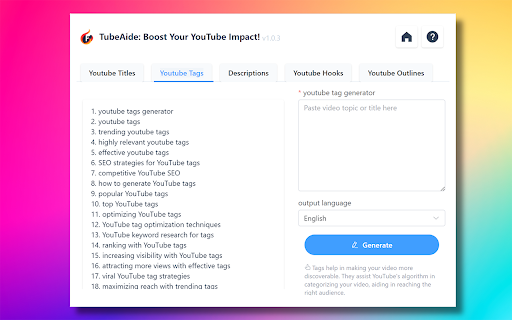
TubeAIde is a Chrome extension designed to optimize YouTube content using AI. It offers a comprehensive suite of tools to enhance video reach and engagement, including generating titles, tags, descriptions, hooks, and outlines. It supports 25 languages for global accessibility.
How to Use
1. Install TubeAIde from the Chrome Web Store. 2. Navigate to the YouTube upload page. 3. Let TubeAIde generate optimized content. 4. Apply the suggestions to improve video performance.
Core Features
AI-Powered Content Generation Multilingual Support SEO-Enhanced Elements Streamlined Content Creation Detailed Analytics Privacy and Security Consistent Updates
Use Cases
- 1 Generating optimized titles, tags, and descriptions for YouTube videos.
- 2 Creating engaging video hooks and outlines.
- 3 Optimizing content for a global audience with multilingual support.
Frequently Asked Questions
How does TubeAIde improve YouTube SEO for creators?
For details, please visit the official website of TubeAIde.
Can TubeAIde help non-English speakers optimize their content?
For details, please visit the official website of TubeAIde.
Is TubeAIde user-friendly for those new to SEO?
For details, please visit the official website of TubeAIde.
Are my video ideas and content secure with TubeAIde?
For details, please visit the official website of TubeAIde.
What is the cost of using TubeAIde?
For details, please visit the official website of TubeAIde.
How often does TubeAIde receive updates?
For details, please visit the official website of TubeAIde.
What sets TubeAIde apart from other YouTube optimization tools?
For details, please visit the official website of TubeAIde.
Quick Info
- Category
- Writing & Editing
- Subcategory
- AI Title Generator
- Rating
- 5.0 / 5.0
- Saved
- 1